Testing out the PAJ GPS vehicle tracker
Now I know what you’re thinking…why are you reviewing a vehicle tracker, isn’t that a bit weird?
I actually have a bit of a history with vehicle trackers as I used to work for a telematics company commissioning and testing their newly installed trackers on commercial vehicles.
We’d install tracking devices on things like fleets of company cars as well as big plant machinery like JCBs, cranes, diggers and even roadwork traffic lights!
I really enjoyed the job, so when I was offered the chance to review a vehicle tracker, I was excited to have a look at how easy it was to install and how the software worked.
I also spend a lot of time talking with small businesses discussing how best to grow and scale what they are doing, and the topic of vehicle trackers for various clients has come up quite often, so I also wanted to test it out to see if it was a viable option I could recommend for them too.
Testing out the PAJ GPS Vehicle Tracker
The team at PAJ very kindly sent me one of their vehicle tracker devices to test and see what I thought of it.
Is the tracker easy to install and use?
Yes the tracker is super simple to install, once it’s fully charged it’s just a case of popping off the front cover to switch the device on, let it find it’s signal and then put the cover back on ready to go in the car.

We’ve just slotted the tracker into the cubby space in the passenger side door although it does come with super strong adhesive pads should you wish to mount it properly in your car.
Once it was in place I went on to the desktop app and had a look at the features as well as logging into the app on my phone.
What can you see on the dashboard and app?
The desktop dashboard gives you a really clear view of the last journey your vehicle has taken.
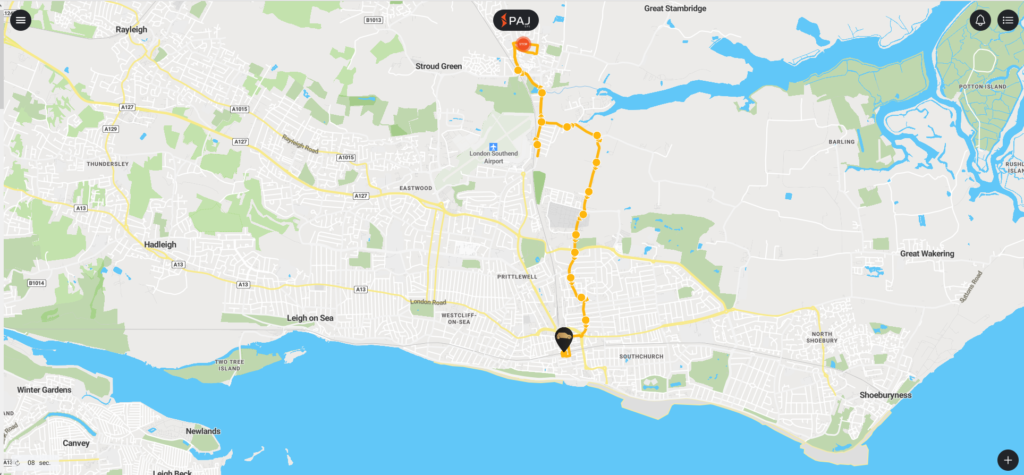
From that screen you can also access the device info, route and alert settings.
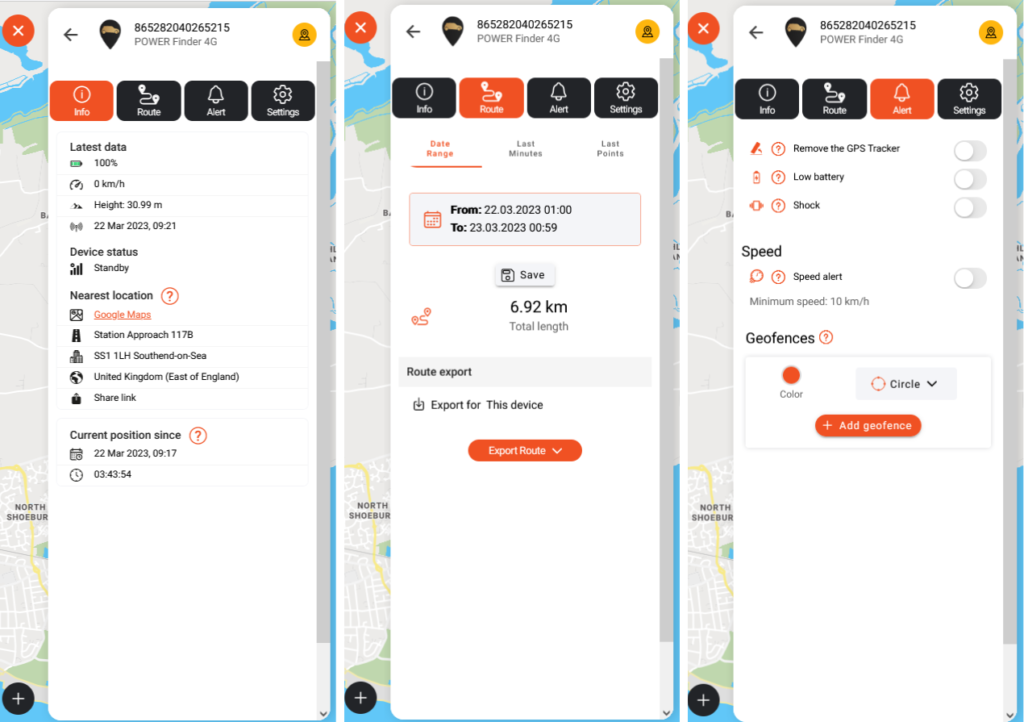
Info
The info panel tells you up to date ‘heakth’ info about the tracked such as the battery level, it’s last received signal and the device status. It also gives the trackers current nearest address location and how long it has been there.
Route
The route panel shows you the last journey taken, its start and finish times plus the distance travelled.
Alert
The alerts panel lets you configure which alerts you want to be triggered by the tracker when certain events happen.
Remove the tracker
This is an alert that can be set to go off if the tracker is removed from its current position. This would be used more on commercial vehicles or fleet cars as it’s to alert to any potential tampeing with the device.
Low Battery
Low battery alert will let you know when the power is running low on the device so that it can be recharged as soon as possible.
Shock
The shock alert can be set to trigger if the tracker shakes, this can be to notify of the tracker being tampered with or also to alert to a potential car accident.
Speed
The speed alert can be set up so that you receive a notification if the vehicle exceeds a speed level that you have set. This is another feature that is more likely to be used for commercial vehicles.
Geofences
Geofences can be set up on the device to notify you when the tracked vehicle is going into or out of a set area.
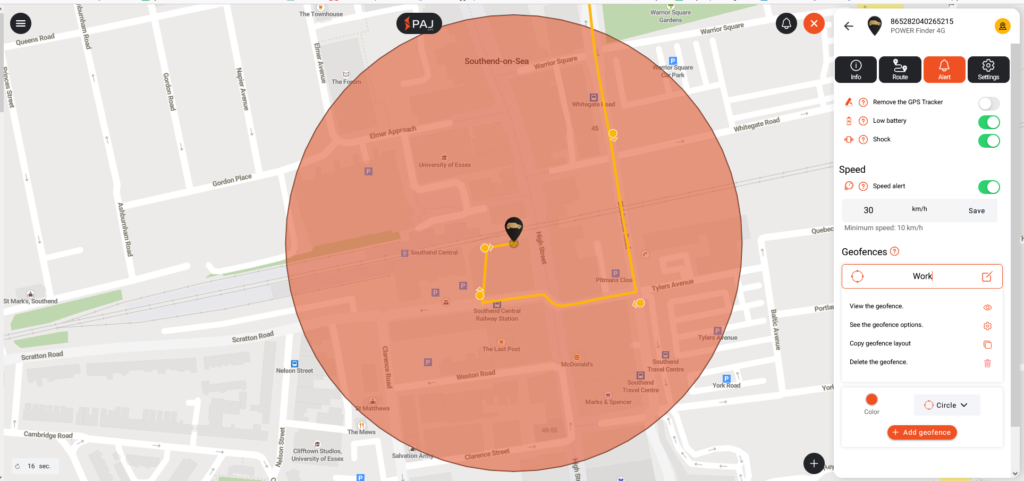
These are a really handy feature to have on a tracker for both personal and commercial use.
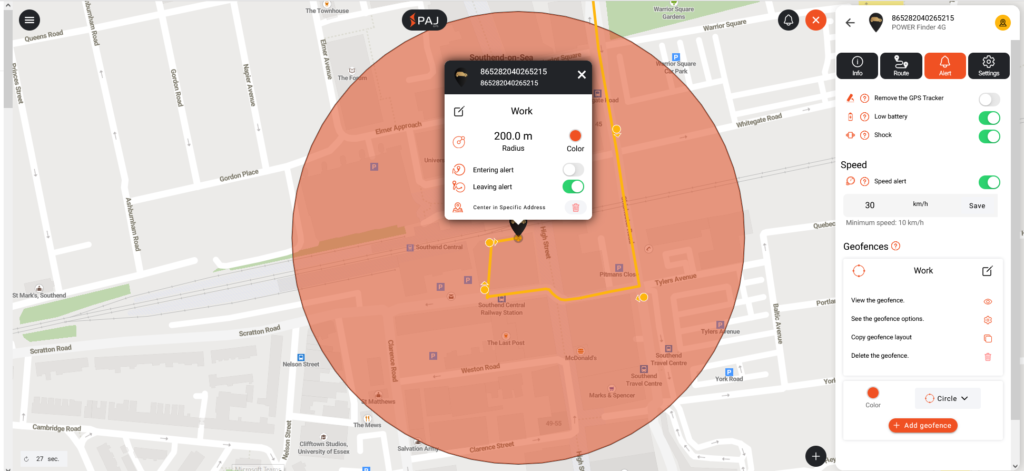
I’ve set one up on our tracker to notify me when my husband leaves his work car park, that way I know I can start prepping dinner for when he gets home!
This feature can also be useful for small businesses such as cleaning companies as alerts can be triggered to show when staff are leaving the premises, and on their way to the next job, I would have loved to be able to track stuff like this when I had a cleaning business as it’s always nice to be able to call a client and say that their cleaner is on their way to them and give them a really accurate arrival time.
What I thought of the tracker
I have to say I am really impressed with the PAJ GPs vehicle tracker. The connectivity and accuracy of the information you get from it is amazing for the price.
My technical knowledge of trackers is slightly outdated now as I’ve not worked in the industry for a while, but the user interface of the desktop app is really simple to use and gives you far more data than you would get from a lot of other non-commercial devices.
We’ve made really good use of the tracker in our personal car, and it’s much more accurate at giving a location than something like the ‘Find my’ function app on our phones.
PAJ GPS have a whole host of other trackers available on their Amazon store, and we’d definitely look to buy something like their luggage tracker device for the next time we go away on holiday!
Car Trackers FAQ
Can adding an aftermarket tracker reduce my insurance?
Adding a tracker to your car could mean you get a discounted rate on your insurance policy; this is because it makes it a lot easier to track and potentially recover should the car be stolen. It’s best to speak to your current insurance provider to ask them for more information on reduced premiums when having a tracker fitted.
Are vehicle tracker locations accurate?
For a vehicle tracker to read accurately, it needs to have a good view of the satellites it’s communicating with. Things like parking in an underground car park, being surrounded by large buildings or being in a heavily wooded area can cause issues with getting a good connection, much like struggling to get service on your phone.
GPS trackers use a sim card for signal and need to be able to ‘see’ at least 4 satellites to offer an accurate location. If the signal isn’t great, then you might get what is called ‘drifting’ this is where the location isn’t perfectly accurate and may drift across an area.


